Universal Trade Capture (UTC) 24x5 Trade Processing FAQ
This page contains frequently asked questions to prepare you for the Universal Trade Capture (UTC) 24x5 trading initiative.
For more information about UTC, see the Universal Trade Capture (UTC) section of the Learning Center.
General Overview

 Why Is DTCC making changes to the trade capture process?
DTCC is proposing a modernized UTC platform that includes offering extended trade capture capabilities to support processing transactions in a 24x5 model. This initiative aims to enhance market accessibility and efficiency, supporting a dynamic and resilient trading environment that meets the evolving needs of market participants.
What is changing in UTC?
NSCC subsidiary plans to increase clearing hours to support 24x5 trade processing with implementation targeted for June 2026, subject to regulatory review and approval of any necessary rule changes. To support overnight trading activities, NSCC is planning to operate the UTC system on a 24x5 schedule from Sunday at 8:00 PM to Friday at 8:00 PM Eastern Time (ET).
What are the benefits of extending trade hours for the trade capture process?
Extending the hours that NSCC can process and clear trades delivers increased client value by maximizing liquidity and reducing counterparty risk. This enables NSCC to apply its central counterparty guarantee to overnight activity across different time zones for global participants.
What additional controls will be implemented as part of the 24x5 Trade Processing Initiative?
NSCC is planning to introduce the following for its upcoming June 2026 go-live:
Separate 9A/9B Trading Relationships for the Overnight Session
NSCC will enhance its Trading Relationship Management system so members can manage broker dealer locked-in agreements separately for the new overnight session. For Correspondent Clearing (CORR) and Qualified Special Representative (QSR) relationships, members wishing to participate in overnight trading must establish and maintain separate relationships for overnight sessions. These relationships can be established through the Automated Special Representative Facility.
High-Value Trade Threshold
UTC contains validation checks to mitigate erroneous trade submissions from entering UTC and being passed to downstream systems. NSCC is building flexibility to set different thresholds for the day sessions and overnight sessions.
How do sending entities submit trades during 24x5 trading hours?
Sending Entities have the option to either continue using existing sending entity or establish a new one.
- If you choose to use your existing Sending Entity, NSCC will implement necessary configuration changes on behalf of your firm. No action is required on your part except a formal confirmation of your intent to participate in the 24x5 trading schedule, which must be submitted to the NSCC Integration Team.
- If you elect to participate by creating a new Sending Entity, you are required to complete the standard onboarding process applicable to new sending entities, including connectivity setup and testing.
If you want to submit trades during the 24x5 trading hours, you must contact NSCC Integration Team at [email protected] to onboard before you can begin processing.
What are the upcoming deadlines to ensure our firm is ready for these changes?
The first phase of this multi-year initiative is targeted for June 2026. All clients who receive the UTC real-time output (UTCO) message must take in the new Financial Information eXchange (FIX) Tag 715 Clearing Business Date field.
To confirm that you can take in the new FIX output tag, you must test the new FIX output tag to ensure that you can process the message, regardless of whether you plan to submit trades during 24x5 trading hours. Testing in the PSE environment will be available in January 2026.
Clients must contact the NSCC Integration team to confirm that you can receive the FIX tag and acknowledge they have tested successfully. For technical considerations, see the UTC Input and Output sections.
Where can I learn more about UTC and the 24x5 Trade Processing initiative?
You can log in to the DTCC Learning Center and access all the UTC resources available to you. UTC resources related to the 24x5 trade processing and upcoming UTC releases are available in the UTC Release section. Additional details can be found on DTCC’s 24x5 Hub on the Transformation Website.
UTC Processing
What does a Sending Entity need to do prior to sending the next trade date trade?
Sending Entities through Financial Information eXchange (FIX) or Message Queue (MQ) must successfully complete the current processing day and balance with UTC before beginning to submit Next Trade Date trades. The Trade Sequence Number (tag 571) must sequentially start at 1 for the next trade date. Additionally, a Sending Entity that is a FIX user must disconnect and then reconnect the FIX engine before submitting trades for the next processing day. This is required so that the Sending Entity can recycle their FIX session following completion of their current processing day.
When can a Sending Entity start sending for the next trade date?
Trade processing for the Next Trade Date begins after 8:00 PM. Any trade received with the Next Trade Date prior to 8:00 PM is rejected.
How are overnight trades impacted when the Sending Entity cannot complete current-day processing by 8:00 PM ET?
If a Sending Entity is unable to successfully close out the current processing day, including sending the Good Night message and balancing with UTC, before the timeframe they want to begin submitting trades for the next trade date, overnight trading submissions may be delayed. For example, if the current day’s processing is completed at 8:30 PM but overnight trades begin at 8 PM, the Sending Entity must wait until the current processing day is finalized before submitting trades for the next day.
To support overnight trading, Sending Entities have two options:
- Continue using the existing Sending Entity: This requires completing the current day’s processing and balancing with UTC before any next-day trades can be submitted.
- Establish a new Sending Entity: This is a standalone connection dedicated to overnight trading. It operates independently and does not impact or depend on the processing status of the existing Sending Entity.
What downtime is required for the fix engine on inbound connections?
From a trade input perspective, Sending Entities setup for 24x5 trading hours can manage their downtime based on their business model. For example, the sending entity submits the Good Night message and is in balance for the current processing day by 8:00 PM on March 20. The Sending Entity disconnects from the FIX engine after recycling their FIX sessions and reconnects on March 20 at 8:01 PM. The sending market can then begin sending trades immediately to UTC for the next day’s trade date, March 21. If a Sending Entity is not set up for 24x5 trading hours, this process remains unchanged.
What downtime is required for the fix engine on outbound connections?
UTC sends the final Good Night message, at approximately 12:00 AM ET, to clearing firms indicating that UTC is closed for the processing day. All outbound FIX engines will disconnect at this time, as per the current process. Clearing firms who receive UTC real-time messages will experience a short pause on output after receiving the Good Night message from UTC.
What time does UTC begin accepting Next Trade Date trades?
NSCC is planning to operate the UTC system on a 24x5 schedule from Sunday at 8:00 PM to Friday at 8:00 PM Eastern Time to support overnight trading activities. UTC is available to begin accepting next day trades starting at 8 PM on Sunday and each subsequent valid U.S. business day, Monday through Thursday evening. Next day trades are not accepted the night before a U.S. holiday. For example, since July 4 is a US holiday, UTC will not accept next day trades on July 3. You must send trades for July 5 after 8:00 PM on July 4.
Does a Sending Entity need to provide the Clearing Business Date?
No, UTC assigns the Clearing Business Date based on the Sending Entity’s processing day.
How will UTC assign the new fix tag Clearing Business Date?
For a Regular Way trade, the trade date will equal the Clearing Business Date. If submitting Next Trade Date Trades, the clearing business date will also be the next day.
| Type of Trade | Trade Date | Clearing Business Date | Settlement Date |
|---|---|---|---|
| Current | 7/13/2026 | 7/13/2026 | 7/14/2026 |
| Next Trade Date | 7/14/2026 | 7/14/2026 | 7/15/2026 |
Do trades submitted the next trade date continue to follow the current Consolidated Trade Summary (CTS) reporting rules?
Yes, CTS reporting rules remain the same. Regular Way trades are reported on the next day’s CTS Cycle 1. If an As-of or cash trade comes in during 24x5 trading, it is reported on the next available CTS cycle.
What happens if I send a Next Trade Date trade before the Good Night message?
If a Sending Entity attempts to process a Next Trade Date trade before the Good Night message is received, the trade is rejected due to the invalid trade date. Sending Entities must send the Good Night message and close out the current processing day, and then resend the Next Trade Date trade.
What happens if I process a current day's trade after sending the Good Night message for the current processing day?
If a Sending Entity submits a prior day’s trade date after the Good Night message has been received, the trade is processed as an As-of trade. As-of trades are included in the 8:30 AM cycle 1 UTC Machine-Readable Outout (MRO) Trade Capture Data File: AutoRoute 02081673 / PSE 02981673 file. You should include and balance these trades in the next day’s Good Night message.
Are there any additional balancing considerations for trade reporting?
When balancing your real-time messages with your intraday MRO files, you should consider that you receive the UTCO realtime message immediately; however, trades with the next trade date are reported the next morning on the intraday MRO file, AutoRoute 02081673 / PSE 02981673.
UTC Input and Output
Are there any changes to UTC output message formats during this phase?
Starting in June 2026, the new FIX Tag 715 Clearing Business Date field will be included in the UTC real-time output (UTCO) message across all clients. This change supports the expanded capabilities. All clients must add the Fix Tag 715 to their processing logic. Clients participating in 24x5 trading must use this tag to ensure trade IDs are unique, avoiding issues with potential duplicates. These clients must also accept two business clearing dates and balance only the current business date. All clients that receive real-time output are required to test and confirm that their systems can properly process this new FIX tag.
See the UTC Common Trade Fix Output Format containing the new FIX Tag 715 in the UTC Release section of the Learning Center.
Are there any changes to UTC input message formats during this phase?
FIX Tag 336 Trading Session ID will be required for all Sending Entities that participate in overnight trading session. See the UTC Common Trade Fix Input Format containing the new FIX Tag 336 in the UTC Release section of the Learning Center. Non-24x5 Sending Entities that elect to include FIX tag 336 Trading Session ID, where its use is optional, must populate the tag with a valid value as defined in the UTC Common Trade FIX Input Format. Submitting an incorrect value results in trade rejection.
Keep in mind that the inbound Trade Sequence Number (tag 571) must sequentially start at 1 for a process date. Trades received after the Sending Entity processes the Good Night message for Next Trade Date must start with Sequence 1. There are plans to add additional fields to the UTC input message format in a later phase of UTC modernization.
Are there plans to expand intraday MRO generation to align with the new processing schedule?
In the initial phase, there are no intraday MRO changes. 24x5 trades will be reported real-time on the UTC FIX output message and reported at 8:30 AM on cycle 1 if the UTC MRO Trade Capture Data File: AutoRoute 02081673 / PSE 02981673 of the UTC Intraday MRO file. There are plans to expand intraday MRO generation in a later phase of UTC modernization.
Institutional Trade Processing
Is the affirmation cutoff time changing in TradeSuite ID®?
No. The affirmation cutoff time remains at 9:00 PM Eastern Time on settlement date minus 1 (S-1).
Settlement Processing
Are there changes to the Settlement process?
No, there are no Settlement processing changes impacted by this UTC 24x5 trade processing initiative.
Asset Servicing
How does UTC 24x5 trade processing affect DTC's Corporate Action processing?
The industry has raised several questions that need to be discussed with Exchanges. Currently, DTC does not have plans to change any processing procedures because of the UTC 24x5 trade processing.
Is the timing of Corporate Action announcements or instructions impacted by the 24x5 trade processing?
No, cutoff times for Corporate Actions Web announcements, elections, or voluntary reorganization instructions remain the same.
DTC announces Corporate Action events upon receipt of notification. DTC is working closely with exchanges to understand any expected and potential changes with respect to Corporate Action announcements published by exchanges. Currently, exchanges have not declared any changes to the timing of Corporate Action events.
Will DTC extend the cutoff times for deposits and DWAC transactions?
At this time, DTC has no plans to extend cutoff times for physical or electronic deposits because of the UTC 24x5 trade processing initiative.
NSCC Risk Considerations
Is NSCC/DTCC going to make changes to accommodate a move to overnight exchange trading, such as requiring Clearing Members to post additional margin or collect Supplemental Liquidity Deposits (SLD)?
There are no changes to DTCC’s Risk Management planned at this time.
Risk stemming from 24x5 trading is managed through NSCC’s current margin design and start of day (SOD) and intraday margin processes, which includes 15-minute recalculation of VaR and mark-to-market. Additionally, the risk from 24x5 trading is managed through the current liquidity risk management program and its calculation of both projected and actual liquidity needs.
NSCC margin is designed to cover various risk factors. Specifically, Margin Requirement Differential (MRD) serves as a buffer and is designed to help mitigate the risks posed to NSCC by day-over-day fluctuations in each Member’s portfolio.
NSCC actively monitors volumes and impact to liquidity needs, specifically as it pertains to 24x5 trade processing, to determine whether the current margin process remains adequate.
When would NSCC receive overnight trades for Value-at-Risk and margin calculations?
Trades received up until the UTC Good Night message are captured in the start of day (SOD) margin calculation. Trades received pre and post UTC Good Night message are captured in NSCC’s intraday UTC monitoring, which includes processes to collect additional margin intraday as needed.
UTC Testing
When can I begin testing?
Client testing in the PSE (Test) environment is scheduled to begin in January 2026. DTCC will provide test guidelines to ensure that clients fully test. For example, clients need to test the new FIX Tag 715 Clearing Business Date field that will be included in the UTC real-time output (UTCO) message. Testing guidelines are available in the UTC Release section of the DTCC Learning Center.
Who must test?
All clients who receive UTC real-time output are required to participate in testing and confirm that their systems can properly process the new FIX tag.
-
To support client readiness, NSCC is producing canned test trades in the PSE U test environment on the second Wednesday of each month.
-
Clients must provide formal email signoff confirming receipt and processing of FIX Tag 715 to the NSCC Integration Team no later than May 15, 2026.
Clients and trading venues will have the opportunity to participate in industry calls throughout this transition period to help prepare for this change. If you wish to be included or have any questions regarding this notice, contact your DTCC Relationship Manager.
What do I need to do to start testing?
Our NSCC Integration Team is your primary point of contact to assist you and your firm with testing. When you are ready to test, you can contact the NSCC Integration team.
Are there tools available for testing or must I partner with a counterparty?
Firms participating in the 24x5 trade processing during the overnight session are responsible for identifying appropriate counterparties for testing. You should coordinate directly with the UTC Sending Entity, Exchange, or Qualified Special Representative (QSR) who supports your firm's overnight trading activity and submits trades on your behalf.
As an alternative to generating test trades through the participating Exchanges, Members can use the NSCC Transaction Management tool. You can use this tool to directly introduce test transactions into the Universal Trade Capture (UTC) system for processing. With this tool, you have the option to manually enter and submit transactions through a data entry form, if preferred. This approach means that Members can submit test trades as the counterparty to the transaction without partnering with another NSCC Member. When testing with the Transaction Management tool, use the test contra account numbers 0122 and 0123. These test accounts have been set up to discourage members from entering test trades with another NSCC Member without a prior agreement from that contra party. This approach ensures that all Members maintain the accuracy and validity of their testing process.
Who can use the Transaction Management tool?
As in the Production environment, test transactions are submitted by 9A Members to counterparties with an existing 9A-9B relationship. With the Transaction Management tool, you can replicate the 9A-9B relationship in the PSE (Test) environment. You can use the tool to submit Correspondent Clearing and Qualified Special Representative (QSR) test transactions to the UTC system in the test environment.
How do I obtain access to the Transaction Management tool for testing?
Your firm's Super Access Coordinator (SAC) can request access to the Transaction Management tool through the same process used for other DTCC and NSCC products and services. You must first have access to the Clearing Dashboard (CLD) in the PSE environment. When requesting access to the Universal Trade Capture (UTC) service, ensure to select all the UTC Transaction (Enter, Inquiry, Submit, and Upload) roles for your firm's accounts.
To access the Transaction Management tool for testing:
- After you are granted access, log in to the MyDTCC portal PSE environment.
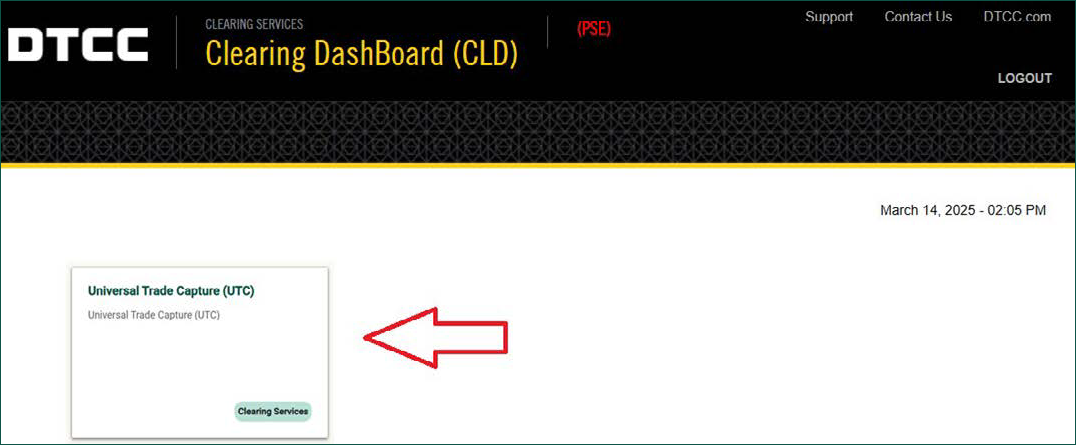
- From the Clearing Dashboard (CLD), access the Universal Trade Capture (UTC) service.
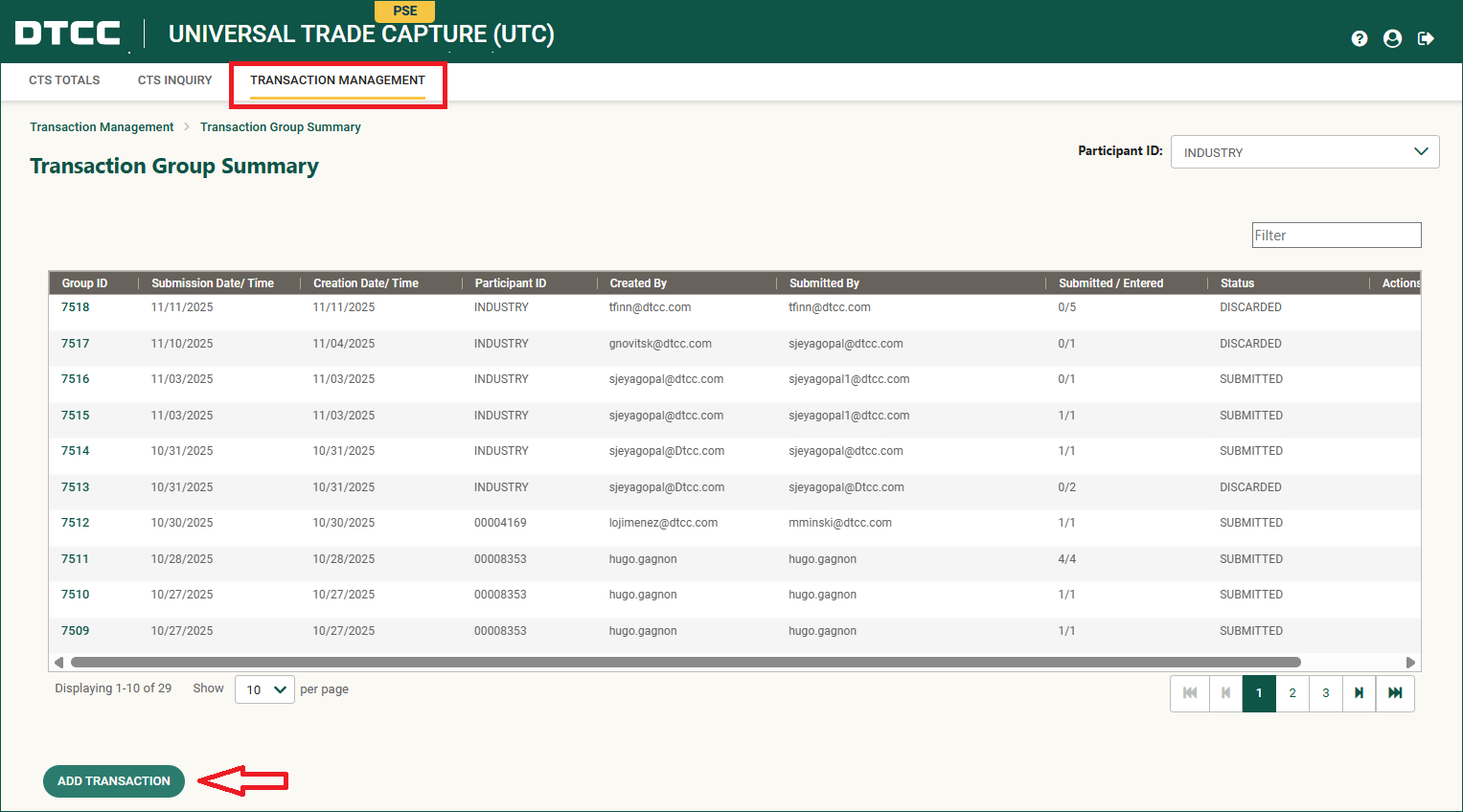
- From Transaction Management, select Add Transaction.
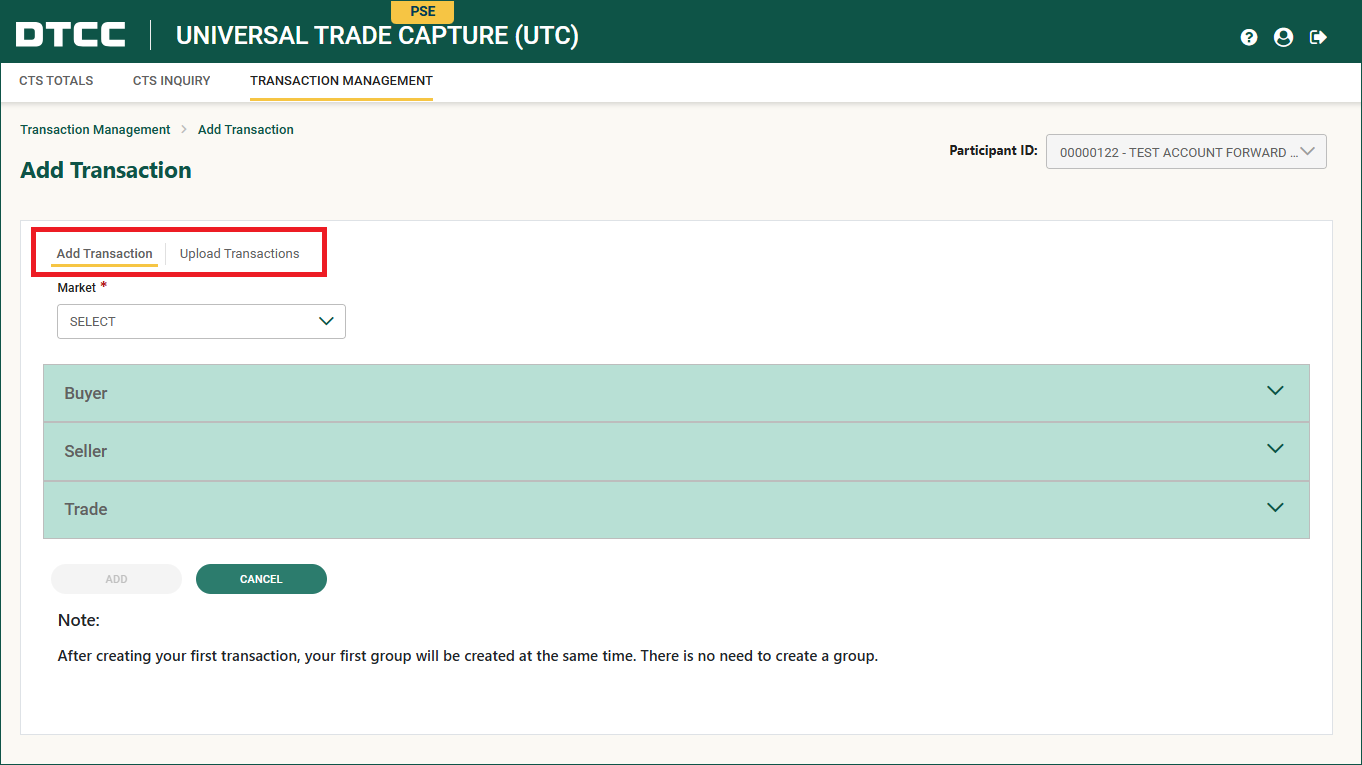
- Use the Add Transaction or Upload Transaction capabilities to submit test trades as the counterparty to the transaction without partnering with another NSCC Member. If you use the Transaction Management tool to test, use the test contra account numbers 0122 and 0123.
Looking Ahead
Are there plans to extend trading beyond 24x5?
DTCC continues to collaborate with our industry partners to ensure the smooth progression and implementation of our modernization initiatives. As DTCC continues to implement initiatives that strengthen the U.S. capital markets, we will continue to collaborate with the member firms to evaluate the potential for extending trading beyond 24x5.
For More Information
-
DTCC 24x5 Hub: www.dtcc.com/24x5
-
DTCC Client Center: www.dtcc.com/client-center
-
DTCC Learning Center: www.dtcclearning.com